Weather Alerts in IW Pro: More Control Than Ever
/IW Pro now includes a powerful set of Weather Alert controls, giving you more flexibility over what you see and how you see it.
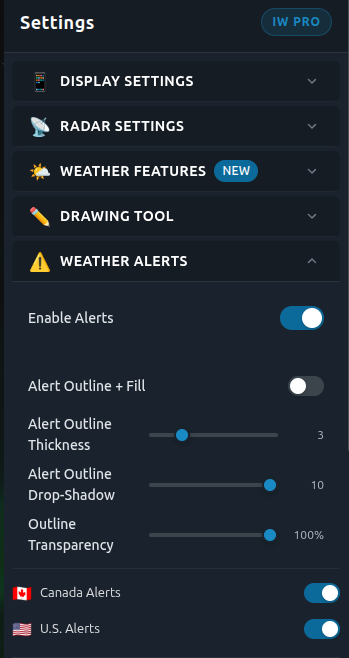
Control official weather alerts and how they appear on the map
IW Pro displays official weather alerts from Environment Canada and the U.S. National Weather Service, and now you can fully customize how those alerts appear.
Customize the Alerts You Receive
You can now choose exactly which alerts matter to you.
Under Weather Alerts, you’ll find:
Canada Alerts and U.S. Alerts toggles
Full control over alert categories, including:
Tornado & Severe Storms
Winter Weather
Flooding
Tropical & Hurricane
Marine & Coastal
Heat & Fire
Wind & Air Quality
Geological Hazards
Public Safety
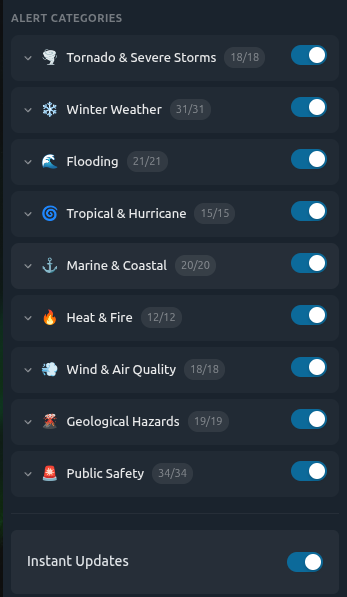
Choose which types of official alerts you want to see
Each category can be expanded so you can turn individual alerts on or off (for example, Blizzard Warnings, Snow Squall Warnings, or Severe Thunderstorm Watches).
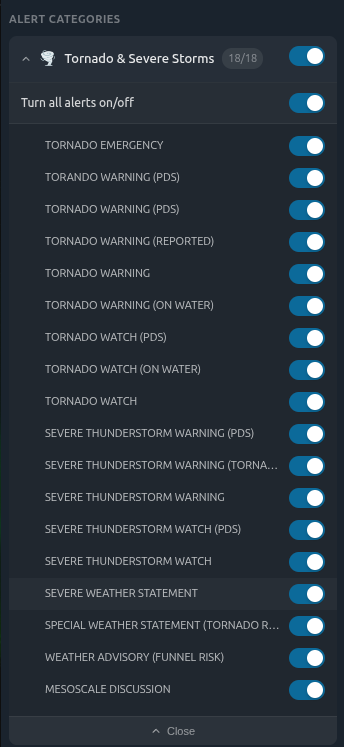
Customize individual alert types within each category
This allows you to reduce noise and focus only on the alerts that matter most to you.
Turn Alerts On or Off Anytime
At the top of the section, you’ll see a simple Enable Alerts toggle.
Turn it on to display official alerts on the map
Turn it off to hide them completely
Control How Alerts Look on the Map
You can also adjust how alerts appear visually:
Alert Outline + Fill (on/off)
Outline Thickness
Drop Shadow
Transparency
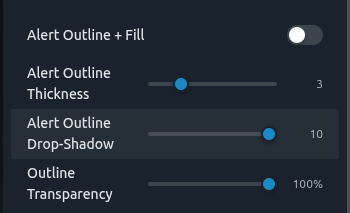
Adjust how alerts appear with outlines, shadows, and transparency
This helps you balance visibility without overwhelming the radar view.
Instant Updates (IW Pro)
In addition to official alerts, IW Pro includes Instant Updates.
These are not official weather alerts. They are issued by the Instant Weather team to provide additional real-time insights, such as:
Rotation detected
Developing storm features
Other notable conditions
You can turn Instant Updates on or off separately, depending on how much additional information you want to see.
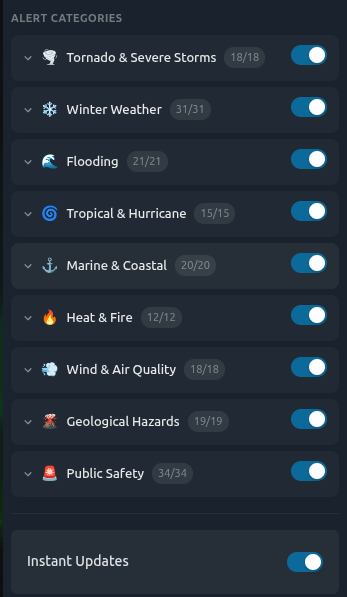
nstant Updates are separate from official alerts and provide additional real-time insights from the Instant Weather team
Why This Matters
Previously, it was not always clear:
Which alerts were being shown
Why certain alerts appeared
Or how to filter them
Now, you are in full control of both:
Official alerts from trusted sources, and
Additional insights from the Instant Weather team
If you have any feedback on the new alert settings, let us know. We are continuing to improve IW Pro based on your input.
-
Examples
- Jul 8, 2026 Spotting Outflow Boundaries in IW Pro Jul 8, 2026
- Jul 23, 2023 Hail spike example Jul 23, 2023
- Jul 22, 2023 Example of bow echo-type storm with counter-rotating vortices Jul 22, 2023
-
Features
- Aug 18, 2026 Understanding Weather Fronts in IW Pro Aug 18, 2026
- Jun 27, 2026 Understanding Storm Relative Velocity (SRV) in IW Pro Jun 27, 2026
- Mar 23, 2026 Weather Alerts in IW Pro: More Control Than Ever Mar 23, 2026
- Mar 23, 2026 Canadian Radar Outages Now Available in IW Pro Mar 23, 2026
- Feb 28, 2025 🛠️ IW Pro Settings Overview (last reviewed May 2025) Feb 28, 2025
- Feb 28, 2025 Environment Canada's "Thunderstorm Outlooks" Feb 28, 2025
- Aug 26, 2024 Listing and full description of alerts Aug 26, 2024
- Aug 26, 2024 IW StormRisk storm track arrows and colour key Aug 26, 2024
- Jul 30, 2024 IW StormRisk is live Jul 30, 2024
- Jul 10, 2024 U.S. alerts Jul 10, 2024
- Jul 10, 2024 Mosaic Radar Layer Jul 10, 2024
- Jul 10, 2024 IW StormRisk preview Jul 10, 2024
- Sep 9, 2023 Measurement tool in single mode Sep 9, 2023
- Jul 24, 2023 🛠️ Requested Features (Updated May 2025) Jul 24, 2023
- Jul 17, 2023 Canadian Alerts Jul 17, 2023
-
Getting Started
- Jul 9, 2026 Getting Started with IW Pro Jul 9, 2026
- May 20, 2025 Introduction to Instant Weather Pro May 20, 2025
- Jul 23, 2023 White screen on mobile - Update Aug 15 Jul 23, 2023
-
How-to
- Mar 23, 2026 How to Update the Credit Card Linked to Your IW Pro or TMA Subscription Mar 23, 2026
- Sep 6, 2023 Adding IW Pro to your Home Screen Sep 6, 2023
- Jul 22, 2023 How to read radar Jul 22, 2023
- Jul 22, 2023 Live Mode vs Regular Mode vs Historical Mode Jul 22, 2023
-
News
- Mar 23, 2026 Weather Alerts in IW Pro: More Control Than Ever Mar 23, 2026
- Mar 23, 2026 Canadian Radar Outages Now Available in IW Pro Mar 23, 2026
- Sep 9, 2023 Measurement tool in single mode Sep 9, 2023
- Sep 9, 2023 Improved experience for Android mobile users Sep 9, 2023
- Sep 6, 2023 Recent Improvements as of Sept 6 Sep 6, 2023
-
Resources
- Jun 24, 2025 🌪️ Tornadoes, Downbursts, and Microbursts: What’s the Difference and How to Spot Them on Radar Jun 24, 2025
- Jul 24, 2023 The Anatomy of the Life of a Supercell Jul 24, 2023
-
Troubleshooting
- Sep 9, 2023 Improved experience for Android mobile users Sep 9, 2023
- Sep 6, 2023 Adding IW Pro to your Home Screen Sep 6, 2023
- Jul 24, 2023 Tip for map on mobile devices Jul 24, 2023
- Jul 23, 2023 White screen on mobile - Update Aug 15 Jul 23, 2023