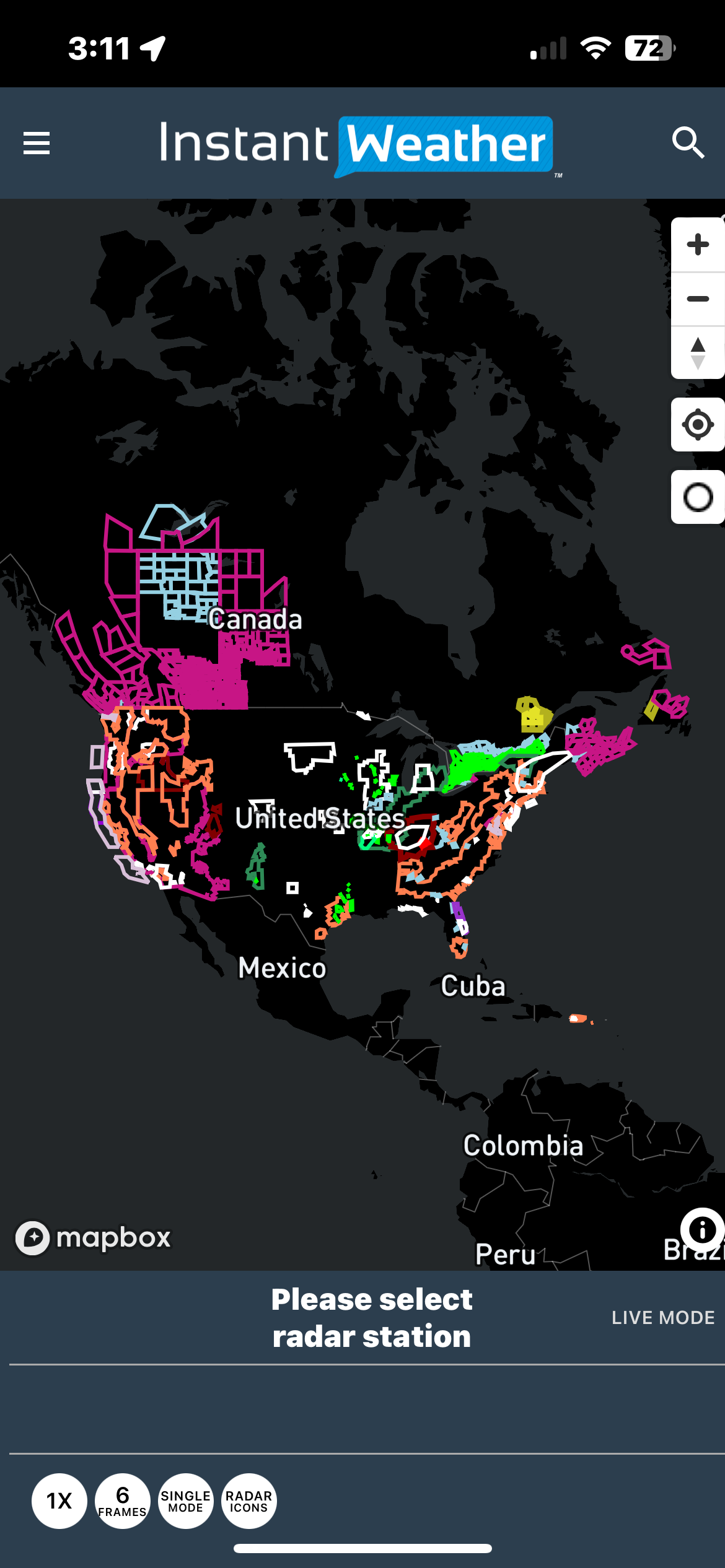
U.S. alerts
/U.S. alerts are now available.
You can turn them on here:
U.S. alerts are now available.
You can turn them on here:
You can now utilize the Mosaic Radar Layer to gain a comprehensive view of weather systems. This feature allows you to zoom in on specific storms of interest for a detailed analysis using IW Pro.
Turn it on in Rendering Parameters:
The Mosiac Radar Layer will be visible if no radar stations are selected. Below alerts and radar icons are turned off:
Below alerts are turned on:
Zoomed into a tornado warned storm:
Selected a radar station and Mosaic Radar Layer is turned off:
Note: The Mosaic Radar Layer is not automatically updated.
A sneak peak at IW StormRisk™, which provides instant updates for storm percentages like Total Severe Risk, Tornado Risk, Severe Wind Risk and Sever Hail Risk. All IW Pro subscribers will gain access to it in the next few days!
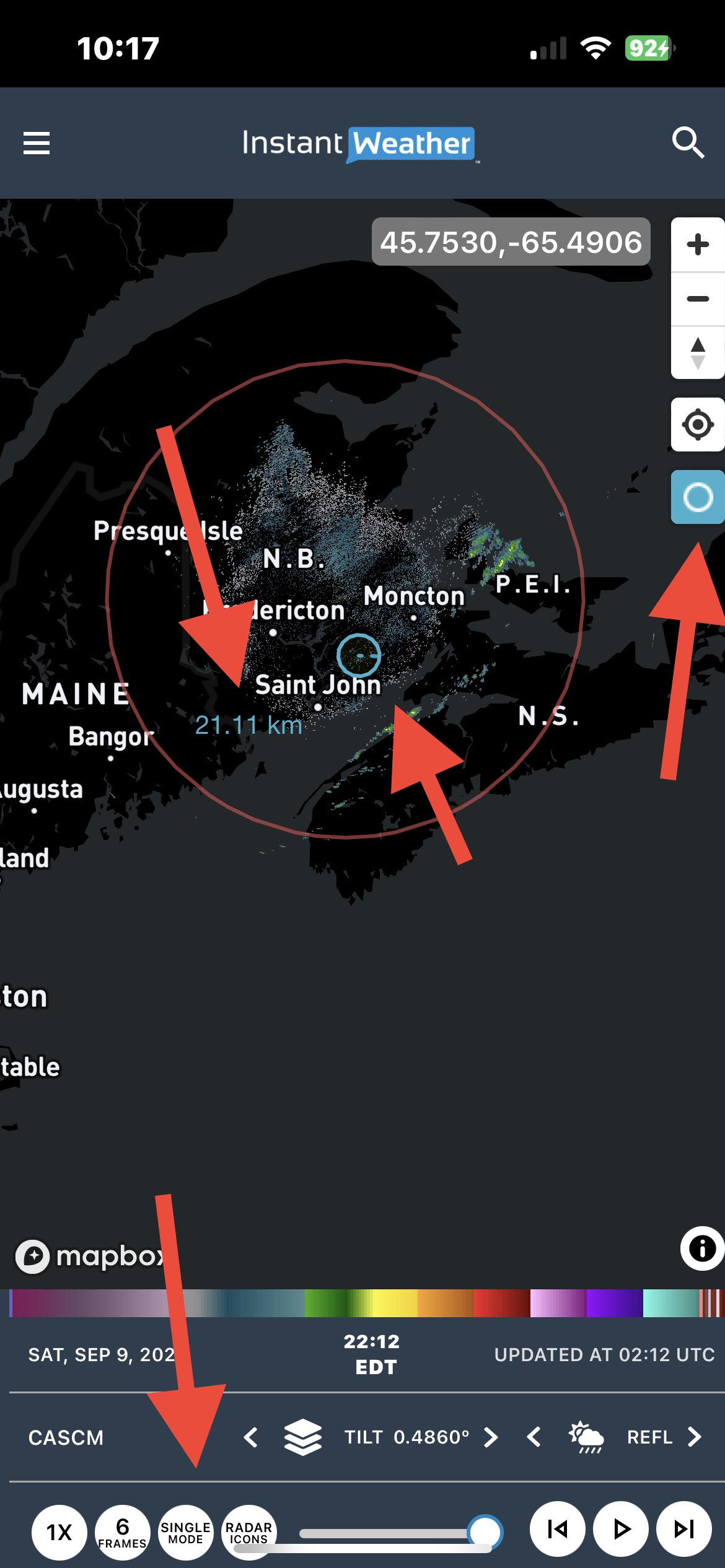
There is now a measurement tool that you can uses when you are in single mode.
Choose Single Mode with any of the products.
Click on the small open circle on the right side of the screen.
With your mouse (PC) or finger (mobile) choose the center point from which to measure and hold until you reach the point you wish to measure the distance to.
The radius of the circle (distance) will be displayed on the screen.
You can also use this circle to “mark” a location and then zoom out.
Click on the small circle again to remove the measurement circle.
In the above example Sussex was chosen as the center mark and I picked a random distance so that when I zoomed out I could see the location of Sussex.
Recent updates to IW Pro have improved the screen handling on Android mobile devices. We recommend that you add IW Pro to your Home Screen and give it another try if you were experiencing issues. People are reporting that they now can use IW Pro in portrait mode more successfully.
updating faster
no more flickering with lightning or alerts
no more lightning conflicts with city names
faster animation
measurement tool in single mode
changing products is faster
If you are having issues seeing the controls at the bottom of the screen on mobile devices please try adding IW Pro to your Home Screen.
We are also working on fixing the issues with Noise Reduction on Canadian Radars.
Update: Some Android users have found that this isn’t working anymore. We think that there was a change made to Chrome. It may work better if you have only one tab in your browser window when you add it to your Home Screen.
Both Android and iOS users should try Opera Mini or Opera if they are experiencing any issues with not being able to see all of the controls.
By adding IW Pro to your home screen you can easily click on the icon that is created instead of going to your browser to open up IW pro. This also has the advantage of giving IW Pro more screen space. You may need to pinch the screen to make IW Pro fit. Since there is no refresh button please click on the chosen radar twice when you need to reload the page.
How to add IW Pro to your home screen:
Safari or Chrome on iOS
open up IW Pro
click on the Share button
scroll to “Add to Home Screen” and click on it
change the name to IW pro (or whatever you would like)
Chrome on Android
open up IW Pro
click on the three dots
scroll to “Add to Home Screen” and click on it
change the name to IW pro (or whatever you would like)
We appreciate all the suggestions that have come in from our awesome community! Some of these features are already in development or under consideration, while others may take time depending on feasibility and system performance. If you have more ideas, feel free to reach out as your feedback helps shape IW Pro.
Lighter coloured map option
A more contrast-friendly map theme for better visibility during daylight or in low-contrast setups.
Drop-down boxes for radar products and elevation/tilts
In addition to arrows, having a drop-down menu can help quickly select specific options.
Switch settings to on/off toggles instead of dropdowns
Aimed at improving mobile usability, especially on touch-based browsers with limited UI support.
Include timestamp info in alerts
More detail about when each alert was issued or last updated.
Auto-load new frames during radar animation
Improve Live Mode so new frames are seamlessly added during playback.
Different error messages when a radar station is down
Distinguish between “station offline” and “network/load issue” to help users troubleshoot faster.
Lightning and alerts in Historical Mode
Currently, historical radar does not display lightning or alerts. This is a frequently requested feature.
Improve Great Lakes visibility
Some users have noted the lakes are hard to see (black on almost black). A visual update is under consideration to make them stand out more clearly.
Improve accuracy of storm track arrows
Arrows occasionally point in the wrong direction. Watching a few frames of reflectivity can help, but backend refinements are planned.
Precipitation type (snow/rain/etc.) in station radar
Currently shown only in Mosaic Radar; users would like to see this per station if feasible.
Map and radar layer customization
This is on the roadmap! Many users have asked to customize map backgrounds, radar colours, and toggle overlay layers.
U.S. Alert Descriptions
These were lost during a rollback to a previous version and are currently not displaying. We plan to restore them in a future update.
Environment Canada Thunderstorm Forecasts
This feature is temporarily unavailable but will return in a future version.
This video by Twister Hunter is “A visual journey through the processes that cause the formation of supercell thunderstorms and tornadoes.”
Included in this video is what can be seen on radar.
On some mobile devices if you select Desktop site in Chrome you will see more of the map. Click the three dots to select Desktop site.
Teressa M reported that is works well with a Samsung S20.
your forecast, on the go