Canadian Radar Outages Now Available in IW Pro
/We have added a new feature in IW Pro that provides more transparency around radar coverage across Canada.
You can now see when and where Canadian weather radars are experiencing outages directly on the map.
When a radar is offline or undergoing maintenance, a red radar icon will appear at that location (see image below). Simply tap or click the icon to view more details about the outage.
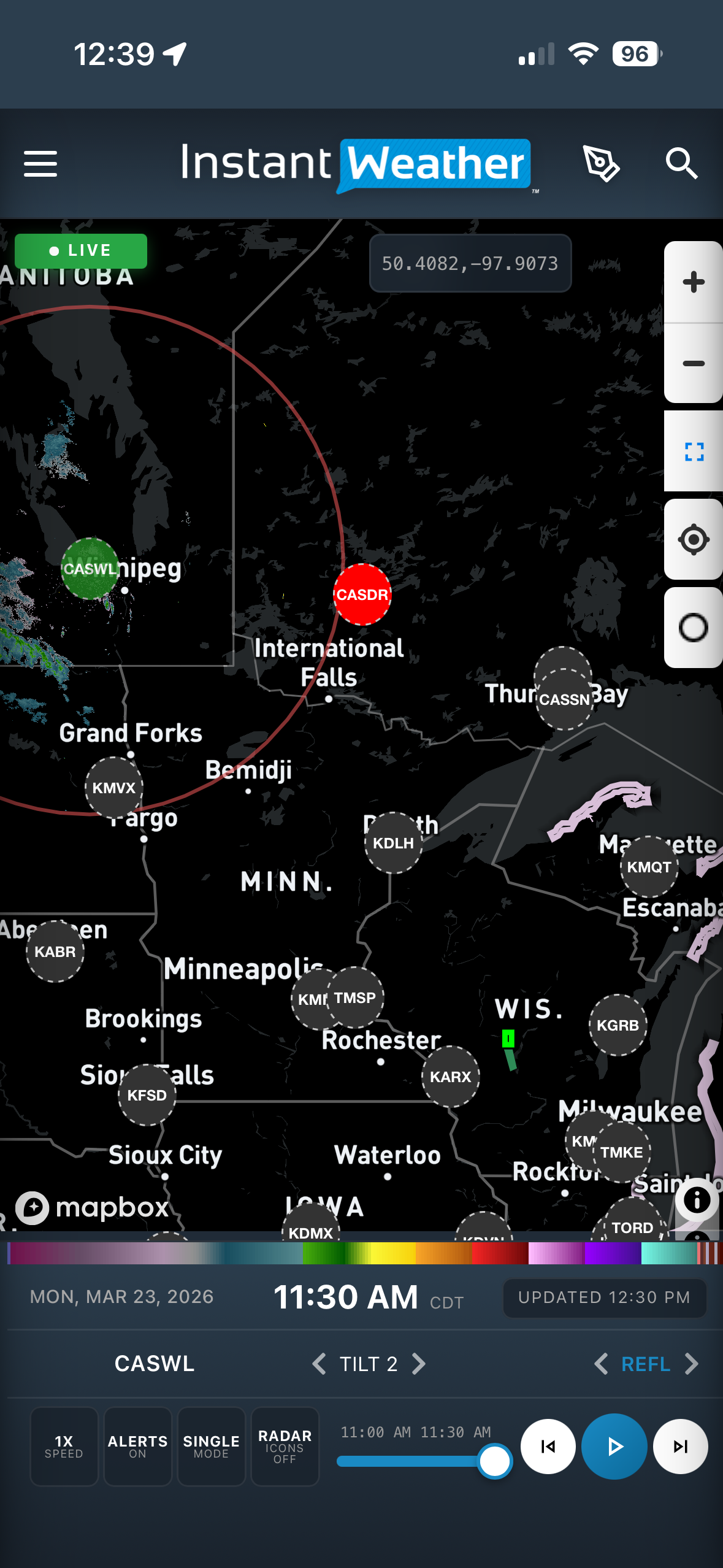
Screenshot 1: Red radar icon shown on the map
After selecting the icon, you will see additional information about the outage, including details provided by Environment and Climate Change Canada.
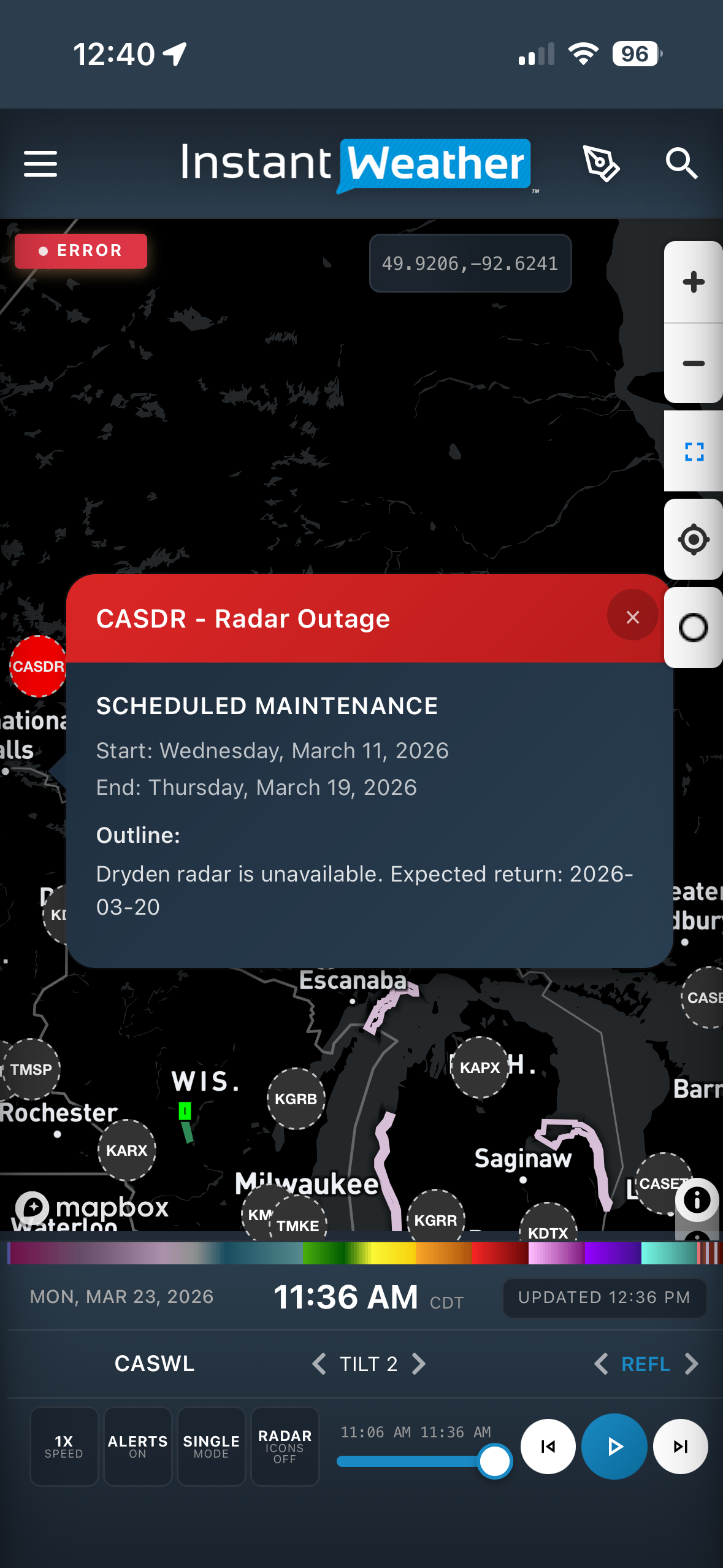
Screenshot 2: Radar outage details after tapping the icon
Previously, it was not always clear whether an issue was with IW Pro or the radar station itself. This update helps remove that uncertainty by clearly showing when a radar outage is the cause.
Outage information is based on data from Environment and Climate Change Canada:
https://www.canada.ca/en/environment-climate-change/services/weather-general-tools-resources/radar-overview/outages-maintenance.html
We are continuing to improve how radar data is displayed in the app, and this is another step toward making the experience clearer and more reliable.
-
Examples
- Jul 8, 2026 Spotting Outflow Boundaries in IW Pro Jul 8, 2026
- Jul 23, 2023 Hail spike example Jul 23, 2023
- Jul 22, 2023 Example of bow echo-type storm with counter-rotating vortices Jul 22, 2023
-
Features
- Aug 18, 2026 Understanding Weather Fronts in IW Pro Aug 18, 2026
- Jun 27, 2026 Understanding Storm Relative Velocity (SRV) in IW Pro Jun 27, 2026
- Mar 23, 2026 Weather Alerts in IW Pro: More Control Than Ever Mar 23, 2026
- Mar 23, 2026 Canadian Radar Outages Now Available in IW Pro Mar 23, 2026
- Feb 28, 2025 🛠️ IW Pro Settings Overview (last reviewed May 2025) Feb 28, 2025
- Feb 28, 2025 Environment Canada's "Thunderstorm Outlooks" Feb 28, 2025
- Aug 26, 2024 Listing and full description of alerts Aug 26, 2024
- Aug 26, 2024 IW StormRisk storm track arrows and colour key Aug 26, 2024
- Jul 30, 2024 IW StormRisk is live Jul 30, 2024
- Jul 10, 2024 U.S. alerts Jul 10, 2024
- Jul 10, 2024 Mosaic Radar Layer Jul 10, 2024
- Jul 10, 2024 IW StormRisk preview Jul 10, 2024
- Sep 9, 2023 Measurement tool in single mode Sep 9, 2023
- Jul 24, 2023 🛠️ Requested Features (Updated May 2025) Jul 24, 2023
- Jul 17, 2023 Canadian Alerts Jul 17, 2023
-
Getting Started
- Jul 9, 2026 Getting Started with IW Pro Jul 9, 2026
- May 20, 2025 Introduction to Instant Weather Pro May 20, 2025
- Jul 23, 2023 White screen on mobile - Update Aug 15 Jul 23, 2023
-
How-to
- Mar 23, 2026 How to Update the Credit Card Linked to Your IW Pro or TMA Subscription Mar 23, 2026
- Sep 6, 2023 Adding IW Pro to your Home Screen Sep 6, 2023
- Jul 22, 2023 How to read radar Jul 22, 2023
- Jul 22, 2023 Live Mode vs Regular Mode vs Historical Mode Jul 22, 2023
-
News
- Mar 23, 2026 Weather Alerts in IW Pro: More Control Than Ever Mar 23, 2026
- Mar 23, 2026 Canadian Radar Outages Now Available in IW Pro Mar 23, 2026
- Sep 9, 2023 Measurement tool in single mode Sep 9, 2023
- Sep 9, 2023 Improved experience for Android mobile users Sep 9, 2023
- Sep 6, 2023 Recent Improvements as of Sept 6 Sep 6, 2023
-
Resources
- Jun 24, 2025 🌪️ Tornadoes, Downbursts, and Microbursts: What’s the Difference and How to Spot Them on Radar Jun 24, 2025
- Jul 24, 2023 The Anatomy of the Life of a Supercell Jul 24, 2023
-
Troubleshooting
- Sep 9, 2023 Improved experience for Android mobile users Sep 9, 2023
- Sep 6, 2023 Adding IW Pro to your Home Screen Sep 6, 2023
- Jul 24, 2023 Tip for map on mobile devices Jul 24, 2023
- Jul 23, 2023 White screen on mobile - Update Aug 15 Jul 23, 2023