Understanding Storm Relative Velocity (SRV) in IW Pro
/Storm Relative Velocity (SRV) is one of the newest radar products available in IW Pro, giving weather enthusiasts another powerful tool for analyzing severe thunderstorms.
While standard Velocity remains the preferred product for most situations, Storm Relative Velocity can make areas of rotation easier to identify when storms are moving quickly.
What is Storm Relative Velocity?
Storm Relative Velocity is based on Doppler Velocity data but with one important difference: it removes the overall forward motion of the storm.
When thunderstorms are moving rapidly, that forward motion can sometimes make it more difficult to identify localized areas of rotation. By subtracting the storm's movement, SRV allows you to focus on the winds relative to the storm itself.
This makes Storm Relative Velocity particularly useful when investigating fast-moving severe thunderstorms, supercells, and squall lines that may contain embedded rotation.
Before You Begin
Storm Relative Velocity requires Storm Tracks to be enabled in Settings.
SRV uses the Storm Tracks system to estimate the storm's motion. Without Storm Tracks enabled, Storm Relative Velocity cannot calculate the storm-relative wind field.
If you do not see SRV working as expected, first confirm that Storm Tracks is turned on.
When Should I Use Storm Relative Velocity?
Storm Relative Velocity is most useful when storms are moving at moderate to fast speeds.
Examples include:
Fast-moving severe thunderstorms
Supercells
Squall lines with embedded rotation
Investigating possible areas of storm rotation
Because the storm's forward motion has been removed, localized areas of rotation may become easier to recognize than they are on the standard Velocity product.
When Should I Use Standard Velocity?
Standard Velocity remains the best choice for most situations.
For slow-moving storms, Storm Relative Velocity often provides little additional benefit and may actually be more difficult to interpret.
Think of SRV as another tool in your weather toolbox rather than a replacement for Velocity. Comparing both products together often provides the best understanding of what is happening within a storm.
Triple Panel Mode Makes Comparison Easy
One of the easiest ways to use Storm Relative Velocity is in IW Pro's Triple Panel Mode.
Configure the panels as:
Left: Reflectivity (REFL)
Centre: Velocity (VEL)
Right: Storm Relative Velocity (SRV)
This allows you to compare storm structure, wind motion, and storm-relative wind motion all at the same time.
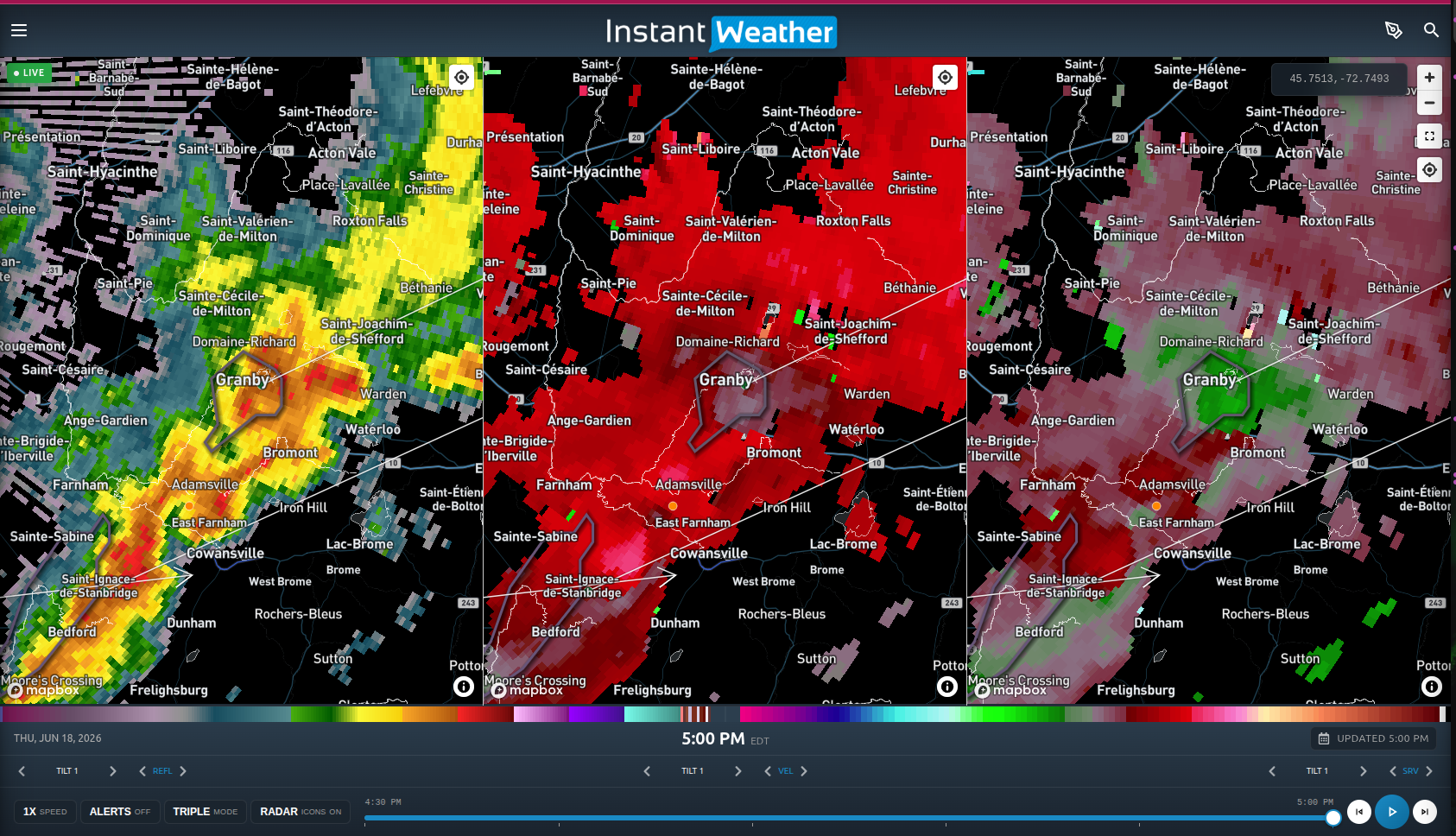
Figure 1. Triple Panel Mode showing Reflectivity, Velocity, and Storm Relative Velocity. The storm in this example is moving northeast at approximately 62 km/h. Because of the storm's relatively fast movement, Storm Relative Velocity helps make localized areas of rotation easier to identify.
Notice that the differences between Velocity and Storm Relative Velocity may sometimes be subtle. SRV is designed to highlight rotation by removing the storm's forward motion. It is not intended to completely change the appearance of the radar image.
Looking at the Example
In the Reflectivity panel (left), we can see the overall structure and intensity of the thunderstorm.
The Velocity panel (centre) shows the winds moving toward and away from the radar. Because the storm itself is moving quickly, that overall motion influences the velocity display.
The Storm Relative Velocity panel (right) removes much of that forward motion, making localized wind patterns easier to examine. This can make subtle areas of rotation stand out more clearly than they do on the standard Velocity product.
Notice that this does not necessarily indicate a tornado. Rotation within thunderstorms is relatively common and can vary significantly in strength. Storm Relative Velocity is simply another tool that can help you better understand what is happening inside a storm.
Using SRV Alongside Other IW Pro Features
Storm Relative Velocity works best when combined with IW Pro's other advanced tools.
As you analyze a storm, compare:
Reflectivity to see the storm's structure.
Velocity to view the actual winds detected by the radar.
Storm Relative Velocity to better identify localized areas of rotation in fast-moving storms.
Storm Tracks to understand where the storm is moving.
StormRisk™ to view computer generated severe weather probabilities.
No single radar product tells the entire story. Using several products together provides the most complete picture of a storm's behaviour.
A Powerful New Tool for Canadian Weather Enthusiasts
Storm Relative Velocity has long been used by meteorologists as an additional tool for analyzing severe thunderstorms. IW Pro now brings this capability to Canadian weather enthusiasts, providing another way to explore and better understand fast-moving storms.
We encourage you to experiment with Storm Relative Velocity during the next severe weather event and compare it with standard Velocity. With a little practice, you'll quickly learn when SRV can provide additional insight into storm rotation and when standard Velocity is the better choice.
-
Examples
- Jul 8, 2026 Spotting Outflow Boundaries in IW Pro Jul 8, 2026
- Jul 23, 2023 Hail spike example Jul 23, 2023
- Jul 22, 2023 Example of bow echo-type storm with counter-rotating vortices Jul 22, 2023
-
Features
- Aug 18, 2026 Understanding Weather Fronts in IW Pro Aug 18, 2026
- Jun 27, 2026 Understanding Storm Relative Velocity (SRV) in IW Pro Jun 27, 2026
- Mar 23, 2026 Weather Alerts in IW Pro: More Control Than Ever Mar 23, 2026
- Mar 23, 2026 Canadian Radar Outages Now Available in IW Pro Mar 23, 2026
- Feb 28, 2025 🛠️ IW Pro Settings Overview (last reviewed May 2025) Feb 28, 2025
- Feb 28, 2025 Environment Canada's "Thunderstorm Outlooks" Feb 28, 2025
- Aug 26, 2024 Listing and full description of alerts Aug 26, 2024
- Aug 26, 2024 IW StormRisk storm track arrows and colour key Aug 26, 2024
- Jul 30, 2024 IW StormRisk is live Jul 30, 2024
- Jul 10, 2024 U.S. alerts Jul 10, 2024
- Jul 10, 2024 Mosaic Radar Layer Jul 10, 2024
- Jul 10, 2024 IW StormRisk preview Jul 10, 2024
- Sep 9, 2023 Measurement tool in single mode Sep 9, 2023
- Jul 24, 2023 🛠️ Requested Features (Updated May 2025) Jul 24, 2023
- Jul 17, 2023 Canadian Alerts Jul 17, 2023
-
Getting Started
- Jul 9, 2026 Getting Started with IW Pro Jul 9, 2026
- May 20, 2025 Introduction to Instant Weather Pro May 20, 2025
- Jul 23, 2023 White screen on mobile - Update Aug 15 Jul 23, 2023
-
How-to
- Mar 23, 2026 How to Update the Credit Card Linked to Your IW Pro or TMA Subscription Mar 23, 2026
- Sep 6, 2023 Adding IW Pro to your Home Screen Sep 6, 2023
- Jul 22, 2023 How to read radar Jul 22, 2023
- Jul 22, 2023 Live Mode vs Regular Mode vs Historical Mode Jul 22, 2023
-
News
- Mar 23, 2026 Weather Alerts in IW Pro: More Control Than Ever Mar 23, 2026
- Mar 23, 2026 Canadian Radar Outages Now Available in IW Pro Mar 23, 2026
- Sep 9, 2023 Measurement tool in single mode Sep 9, 2023
- Sep 9, 2023 Improved experience for Android mobile users Sep 9, 2023
- Sep 6, 2023 Recent Improvements as of Sept 6 Sep 6, 2023
-
Resources
- Jun 24, 2025 🌪️ Tornadoes, Downbursts, and Microbursts: What’s the Difference and How to Spot Them on Radar Jun 24, 2025
- Jul 24, 2023 The Anatomy of the Life of a Supercell Jul 24, 2023
-
Troubleshooting
- Sep 9, 2023 Improved experience for Android mobile users Sep 9, 2023
- Sep 6, 2023 Adding IW Pro to your Home Screen Sep 6, 2023
- Jul 24, 2023 Tip for map on mobile devices Jul 24, 2023
- Jul 23, 2023 White screen on mobile - Update Aug 15 Jul 23, 2023